What Happens Inside Amazon's Warehouse When You Send an FBA Shipment (With Photos).
You print your FBA labels, pack your boxes, book the freight, and watch the tracking until it says "Delivered." Then you check Seller Central obsessively for 3-7 days until your units show as "Available." And at some point, they start selling.
But what happens between "Delivered" and "Available"? What happens to your actual, physical products once they disappear into a million-square-foot building? Where do they go? Who touches them? Why do some of them vanish?
I spent three months researching Amazon's fulfillment operations: talking to former warehouse associates, operations managers, and logistics consultants who have been inside these buildings. Here is what I learned.
Step 1: Arrival at the Dock
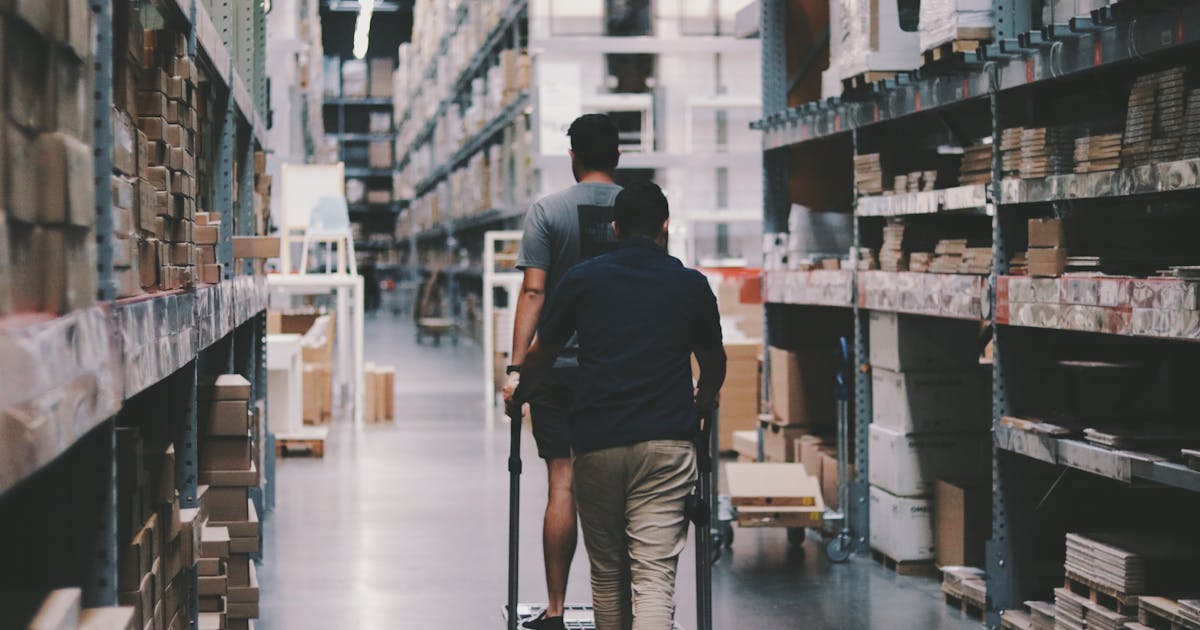
Your shipment arrives at one of Amazon's 110+ fulfillment centers in the US. These buildings are massive: typically 800,000 to 1,000,000 square feet. Think 18 football fields under one roof.
Trucks line up at receiving docks. During normal periods, a truck might wait 1-2 hours for a dock assignment. During peak season, that wait can stretch to 6-12 hours. Your freight carrier does not get priority because you paid for expedited shipping to Amazon, dock scheduling is first-come, first-served.
When the truck backs in, a receiving team unloads your pallets or boxes onto the dock floor. This is the first moment where damage can occur. Forklifts move fast. Dock workers process hundreds of shipments per shift. Your carefully packed boxes are one of thousands that day.
Step 2: Receiving Scan
Each box from your shipment gets scanned at the receiving station. The associate opens the box, scans each unit's barcode (FNSKU or UPC), and confirms the quantity against what your shipment plan says should be there.
Here is where the first data problems happen:
- Barcode scan failures: If your FNSKU label is wrinkled, smudged, or placed over a curved surface, the scanner may not read it. The associate either rescans (adding time) or manually enters the ASIN (adding error potential).
- Count discrepancies: If you said 48 units in a box but there are 47, the associate logs a discrepancy. If there are 49, one unit might get scanned under a different shipment or set aside as "unknown."
- Commingled inventory confusion: If you use manufacturer UPCs instead of FNSKU labels, your units enter the commingled pool, mixed with identical products from other sellers. This is how counterfeit complaints happen to legitimate sellers.
Receiving associates process 100-200 units per hour. They are measured on speed. They are accurate, but they are human, and they are fast. A 0.5% error rate at receiving means 1 out of every 200 units has some kind of data issue from the start.
Step 3: The Conveyor System
After receiving, your products go onto conveyor belts. Amazon's fulfillment centers have miles of conveyor systems, literally. A single building can have 15+ miles of conveyors running across multiple floors.
Your products ride these conveyors to the stow area. Along the way, they pass through automated scanners that read barcodes, weigh items, and measure dimensions. This data feeds Amazon's inventory system in real-time.
The conveyors are where most physical damage occurs. Products fall off. They get jammed at merge points. Heavy items crush lighter ones. Loose products without proper poly-bagging get caught in rollers. I spoke with a former associate who estimated 0.05-0.1% of items sustain some level of damage on the conveyor system alone, minor scuffs to crushed packaging.
Step 4: Random Stow (This Is the Counterintuitive Part)
Here is the part that surprises most sellers: Amazon does not store your products together.
Your shipment of 500 units does not go onto a shelf with your brand name on it. Each unit gets placed in a random bin, on a random shelf, in a random section of the building. Your 500 units might end up in 400 different locations across 4 floors.
This system is called random stow (or chaotic storage), and it is one of Amazon's most important operational innovations. It seems insane. It is actually brilliant.
Why random stow works:
- Maximizes space utilization: Instead of reserving shelf space for each seller or product category, Amazon fills every available slot. No wasted space.
- Shortens pick paths: When an order comes in for 3 different products, the picker can find them in nearby bins instead of walking to 3 different zones. The algorithm calculates the shortest walking path across random locations.
- Prevents congestion: If all phone cases were in Zone A, pickers would crowd that zone during iPhone launch week. Random distribution spreads demand across the entire building.
- Enables redundancy: If your product is in 400 locations, one section going offline (broken conveyor, water leak, etc.) only affects a fraction of your inventory.
The stow associate scans the product, scans the bin, and places the item. The system now knows: "FNSKU B00XYZ123 is in bin A-23-R-47, floor 3, row 23, rack R, slot 47." Multiply that by 10-20 million unique items in a single building.
This is also why inventory goes "missing." If a stow associate places a unit in a bin without scanning it, the physical item exists but the system does not know where it is. That unit is effectively lost until a cycle count team finds it: which could be days, weeks, or never.
Step 5: Storage (The Waiting Game)
Once stowed, your inventory sits and waits for someone to buy it. Storage conditions vary by facility:
- Temperature: Most fulfillment centers are not climate-controlled on the warehouse floor. Summer temperatures can reach 85-95°F inside. Not great for chocolate, candles, or anything heat-sensitive.
- Humidity: Not controlled. Coastal facilities and those in the Southeast have higher humidity, which can affect packaging, labels, and moisture-sensitive products.
- Dust and debris: Standard warehouse environment. Products in open bins accumulate dust over time. Another reason poly-bagging matters.
This is why Amazon charges long-term storage fees, they want inventory moving, not sitting. Products stored for 181-365 days are charged $2.40/cubic foot/month. Over 365 days: $6.90/cubic foot/month. These fees are designed to punish slow movers and free up bin space for faster-selling inventory.
Step 6: The Pick
A customer orders your product. Within seconds, Amazon's system identifies which bin your item is in and assigns it to a picker. In modern robotics-equipped fulfillment centers, the shelf literally comes to the picker. Kiva robots (now called Amazon Robotics) carry entire shelf units to a pick station.
In non-robotics buildings, the picker walks to the bin. Average pick rates are 100-120 units per hour. Pickers use handheld scanners that display the bin location, product image, and expected barcode. They scan the item to confirm they picked the right one.
Pick accuracy at Amazon is remarkably high, estimated at 99.8-99.9%. But on 5 billion+ items shipped per year in the US alone, even 99.9% means 5 million mispicks annually. That is 5 million customers who receive the wrong item. Some of those wrong items are yours.
Step 7: Pack
The picked item goes to a packing station. A packing associate scans the item, and the system recommends the optimal box size. Amazon uses a proprietary algorithm that calculates the smallest box that fits the item plus appropriate packing material.
This is where the "why did Amazon ship a tiny product in a massive box?" problem comes from. The algorithm optimizes for speed, not material efficiency. If the recommended small box is not stocked at that packing station, the system suggests the next available size. The packer does not walk across the building to find the right box, they use what is in front of them.
Multi-item orders get interesting. The system determines whether to ship items together or separately based on: where each item is located in the building, box availability at the nearest pack station, delivery promise timing, and carrier pickup schedules. Sometimes splitting an order into two shipments gets both items there faster than waiting to consolidate.
Step 8: Ship
Packed boxes go onto outbound conveyors. They pass through automated label applicators that print and apply the shipping label. Then they are sorted by carrier and destination, sliding down chutes into the correct trailer or delivery vehicle.
Amazon increasingly uses its own delivery fleet (Amazon Logistics) for last-mile delivery. In major metro areas, 60-70% of Amazon packages are delivered by Amazon's own drivers, not UPS or USPS. This gives Amazon end-to-end control but also means delivery quality varies by market, some Amazon Logistics stations are better-managed than others.
Where Things Go Wrong (And What You Can Do About It)
Problem 1: Inventory Count Discrepancies
You shipped 500 units. Amazon received 487. Where are the other 13?
Possible causes: miscounted during packing (your error), miscounted during receiving (Amazon's error), damaged on the conveyor and disposed of, scanned under the wrong shipment ID, or physically present but not scanned during stow.
What to do: Wait 30 days. If units do not appear, open a reimbursement case in Seller Central referencing your shipment ID and the specific shortfall. Include your own packing records (photos of packed boxes, packing slips with counts) as evidence.
Problem 2: Warehouse Damage
Your product arrived at Amazon in perfect condition but the customer received it damaged. This happens during stow, pick, pack, or conveyor transit.
What to do: Check your Inventory Adjustments report for "Warehouse Damage" disposition codes. Amazon should reimburse these automatically, but audit monthly. Roughly 30% of eligible reimbursements require manual claiming. Note that since 2026, Amazon reimburses at sourcing cost rather than selling price, a significant reduction.
Problem 3: Commingled Inventory Issues
If you use manufacturer barcodes instead of FNSKU labels, your units mix with the same product from other sellers. If another seller ships counterfeits, a customer might receive the counterfeit but your account gets the complaint.
What to do: Switch to FNSKU labeling for everything. Yes, it costs $0.55/unit if Amazon labels for you, or time if you label yourself. But it keeps your inventory isolated from other sellers' quality problems. This is non-negotiable for any seller who values their account health.
Problem 4: Stranded Inventory
Your inventory is in the warehouse but not available for sale. Common causes: listing suppressed, ASIN merged/split, or a data error during receiving that left units in limbo.
What to do: Check your Stranded Inventory report weekly. Most stranded inventory can be fixed by re-listing the product or updating the listing to match Amazon's catalog. Unfixed stranded inventory gets disposed of after 30 days. Amazon does not wait for you to notice.
Why This Matters for Your Business
Understanding what happens inside the warehouse changes how you think about FBA in three ways:
First, you stop trusting the numbers blindly. Amazon's inventory counts are estimates, not facts. They are highly accurate estimates, but when you have 5,000 units across 8 fulfillment centers in 3,000 random bins, small errors compound. Audit your inventory monthly. Compare Amazon's count to your expected count based on shipments in minus sales out.
Second, you optimize your prep for Amazon's process, not your own. Poly-bag everything. Use FNSKU labels. Pack to exact weight specifications. Label boxes clearly. These are not suggestions: they are insurance against the receiving, conveyor, and stow steps where most problems originate.
Third, you build redundancy into your fulfillment strategy. FBA is excellent for Prime visibility and speed. But a single system handling your entire fulfillment, with random stow, automated conveyors, and high-speed picking, has failure modes that you cannot control. The sellers who sleep best at night are the ones who also fulfill from their own warehouse or a 3PL, keeping multi-channel inventory visibility so they can shift fulfillment if FBA has issues. That cross-channel visibility, knowing exactly what is at Amazon, what is at your 3PL, and what is in your own stockroom, is what separates reactive sellers from proactive ones.
Your products are in good hands at Amazon. But they are in fast hands. The system is optimized for speed and scale, not for the careful, gentle handling your grandmother would give your products. Know the process. Prep for the process. And audit the results. That is how the best FBA sellers operate.
Frequently Asked Questions
Random stow (also called chaotic storage) is counterintuitive but highly efficient. By scattering products randomly across the facility, Amazon ensures that pick paths are short, a picker can grab items for multiple orders without walking to the same zone repeatedly. It also prevents bottlenecks: if 50 sellers all ship phone cases, grouping them together would create a congested zone during Prime Day. Random stow distributes demand evenly across the building.
Typically 3-7 business days from when your shipment arrives at the dock. During peak seasons (October-December), it can stretch to 2-3 weeks. Amazon processes shipments in order of arrival, and there is no way to expedite receiving. Your inventory shows as 'Checked In' on the shipment dashboard but is not available for sale until it is fully received and stowed, which can be days apart.
Most 'lost' inventory is not physically missing: it is a data problem. During receiving and stow, if a barcode scans incorrectly, an item gets placed in a bin without being scanned, or a conveyor system routes a unit to the wrong area, the physical item exists but Amazon's system does not know where it is. Some inventory is genuinely damaged by conveyor systems, forklifts, or bin overcrowding. Amazon's internal discrepancy rate is estimated at 0.1-0.3% of units: small in percentage terms, but on millions of units, that adds up.
No. Amazon's Inventory Placement Service lets you ship to fewer locations, but Amazon decides which locations. The distributed inventory model means Amazon may split your single shipment across 4-6 fulfillment centers to position inventory closer to predicted demand. You pay for this distribution through your FBA fees. Fighting it by shipping everything to one center results in slower delivery times and lower organic ranking.
Go to Seller Central > Reports > Fulfillment > Inventory Adjustments. Look for disposition codes like 'Warehouse Damage' or 'Missing from Inbound.' For items lost during receiving, wait 30 days after shipment delivery, then open a case with Seller Support referencing the shipment ID and specific SKUs. For warehouse-damaged items, Amazon should reimburse automatically, but check monthly, roughly 30% of eligible reimbursements are not processed automatically and require manual claims.
Three things make the biggest difference: First, label every unit with a scannable FNSKU barcode, do not rely on manufacturer UPC barcodes, which have higher mis-scan rates. Second, pack boxes to Amazon's weight and dimension specs exactly, overweight or oversized boxes get flagged and delayed. Third, ship fewer, smaller shipments instead of massive pallets, smaller shipments move through receiving faster and are less likely to have count discrepancies.
Related Articles
View all
Prime Day Is Coming Early: The June Sales Shock Sellers Can't Ignore
Amazon confirmed Prime Day 2026 will happen in June. That changes inventory, cash flow, retail media, offers, and back-to-school timing for ecommerce sellers.

Amazon Rufus Can Track Prices and Auto-Buy. Your Listings Are Not Ready
Amazon Rufus can research products, track prices, and auto-buy when prices drop. Sellers need listings that answer real buyer questions, not keyword-stuffed pages.
Amazon Inventory Management: FBA Restock Limits, IPI Score & Automation
Master Amazon FBA inventory management in 2026. Understand IPI scores, restock limits, stranded inventory fixes, long-term storage fees, and how to automate replenishment across multiple sales channels.